Companies with private apps
Give your people a branded app store for your private and internal apps, and manage the devices they use for work.


Apple device management and private apps
LiveManage your iPhones, iPads and Macs, and give your people their own branded app store.
AppDeploy puts device management, private app distribution and release controls in one workspace for iPhone, iPad and Mac. The first 5 devices are free, then £1 per device a month, with every device feature included at that one price. Your branded app store and release controls are £29 a month, with or without devices.
Live at appdeploy.scotitech.com
AppDeploy console
01 / Devices and apps
Devices
5 free, then £1
Devices
iPhone, iPad, Mac
Free
First 5 devices
Then
£1/device/mo
App store
£29/mo
The problem
With AppDeploy
One workspace
Most teams juggle a device tool, an app portal and a spreadsheet for the auditor. AppDeploy, built and operated by ScotiTech Solutions Limited, replaces all three. Company devices set themselves up, apps arrive on the right phones and laptops, and every change leaves a record you can hand to an auditor.
See AppDeploy device managementOne console and one price for every Apple device your company owns. A Mac counts as one device, the same as an iPhone.
Apple Business stays the source for your devices, apps and licences. AppDeploy syncs it on a schedule and does the rest.
See every device and who it belongs to, with a plain status: Healthy, Action required or Not reporting.
An asset register, daily compliance history and device records for SOC 2, ISO 27001 and Cyber Essentials, ready to download or send to Vanta.
Capabilities
Devices bought through Apple Business appear in AppDeploy on their own and set themselves up with your settings and apps. Any other iPhone, iPad or Mac enrols with a link.
Ready-made security settings for iPhone, iPad and Mac, passcode rules on Apple's declarative method, an app allow-list for company phones, and compliance rules that flag any device that drifts.
Turn on FileVault on company Macs and keep each recovery key in escrow. AppDeploy keeps the Activation Lock bypass code, so a leaver's Apple Account can never lock a company device.
Set macOS, iOS and iPadOS update deadlines, and keep Mac App Store apps and the Mac packages you upload up to date by a date you choose.
Lock-screen message and Mac login text, company wallpaper, and device names such as ACME-MAC-0042 that match your asset register, applied again automatically after an erase.
Lock, Lost Mode with your message, erase, restart and shut down, Return to Service, single-app kiosk mode and Mac Remote Desktop, each with a reason and an audit record. Erase can need a second admin's approval.
Every device has an owner and one plain status: Healthy, Action required or Not reporting. Device and compliance alerts arrive in Slack, Microsoft Teams or your webhooks.
Daily compliance history, an asset register download, the full software list on company-owned devices, and device records mapped to SOC 2, ISO 27001 and Cyber Essentials controls.
Send device records to Vanta, export them for Drata, require a managed device with Okta Verify, and sign admins in with Google or Microsoft.
Install Apple Business apps, Custom Apps, App Store apps and Web Clips without a prompt on supervised devices, with managed app configuration, apps staff cannot delete and notifications they cannot turn off.
Push VPN settings and certificates, and deploy your chosen security agent to company Macs with its permissions approved in advance, so it installs without prompts.
Offboard a leaver in one flow: wipe or reissue their devices, take back app licences and keep a record. Move company devices on iOS, iPadOS and macOS 26 from another tool without erasing them.
Who it's for
AppDeploy works for any organisation with Apple devices. These three get the most from it.
Give your people a branded app store for your private and internal apps, and manage the devices they use for work.
Set up company Macs, iPhones and iPads as the team grows, with the device evidence a SOC 2, ISO 27001 or Cyber Essentials audit asks for. Free for up to 5 devices.
Refer clients to AppDeploy or resell it with your own support. Your partner workspace is free.
How it works
Create a workspace, connect Apple Business and enrol your first 5 devices free. Every feature is open for 14 days, with no card needed.
Admins sign in with Google or Microsoft, or with a password and two-step verification. Enterprise adds SAML/OIDC single sign-on and SCIM.
Choose security settings, update deadlines, FileVault, wallpaper and lock-screen text. Every new device gets them automatically.
Devices bought through Apple Business set themselves up out of the box. Any other device enrols with a link.
Assign apps by group, open your branded app store to staff, and ship each new build through Release Guard.
Download the asset register and compliance history, send device records to Vanta, and offboard leavers in one flow.
Delivery
Getting an app into AppDeploy and getting it onto a phone or Mac are two separate decisions. Pick the route that matches how much control you have over the hardware, and run all three side by side.
Staff open your company app store, on your own web address if you want, and install what they are entitled to. Nothing is installed on the device beyond the apps themselves.
Assign an app and the device installs it on its own. No prompt, no tap and no App Store visit for the employee.
Devices bought through Apple Business appear in AppDeploy on a schedule and pick up your default setup. The employee unboxes, joins Wi-Fi, and the device arrives configured.
The branded app store reaches any number of people with no enrolment and no per-device fee. Device management is £1 per device a month beyond the free 5, and it installs every app on enrolled devices, Apple Business apps included.
Read the full delivery guideRelease controls
Assigning an app is the easy part. Knowing it arrived, catching a bad build before it ships, and proving all of it afterwards is what AppDeploy's release layer does.
Every artefact is preflighted before it can reach a device: identity, version, signing validity, OS support, and what changed since the last release. A failed check blocks the push, and a check we cannot perform says "unknown", never "passed".
Ship to a first group, expand when you choose. Maintenance windows, deadlines, pause and resume, and a failure threshold that pauses the rollout by itself before more devices get a bad build.
Every device that hasn't converged tells you exactly why (not assigned, blocked release, device offline, retries exhausted) with the evidence behind it and the one action that fixes it.
Before a rollout starts: licence shortfalls, incompatible devices, expiring certificates and stale device data, each with the number of devices affected, never a vague warning.
One download proving what was released, to whom, and with what outcome, checksummed so an auditor can verify it independently. Included with Distribution.
Ship builds from CI with the release upload API, the AppDeploy GitHub Action, Fastlane, or Zapier and Make.
We replaced three different manual processes with a single AppDeploy workspace. Our IT team now ships updates to 40+ employees faster, and install-related support is much easier to manage.

Rohit Ahlawat
Director, Aviskaar Enterprises
ClarityPath case study
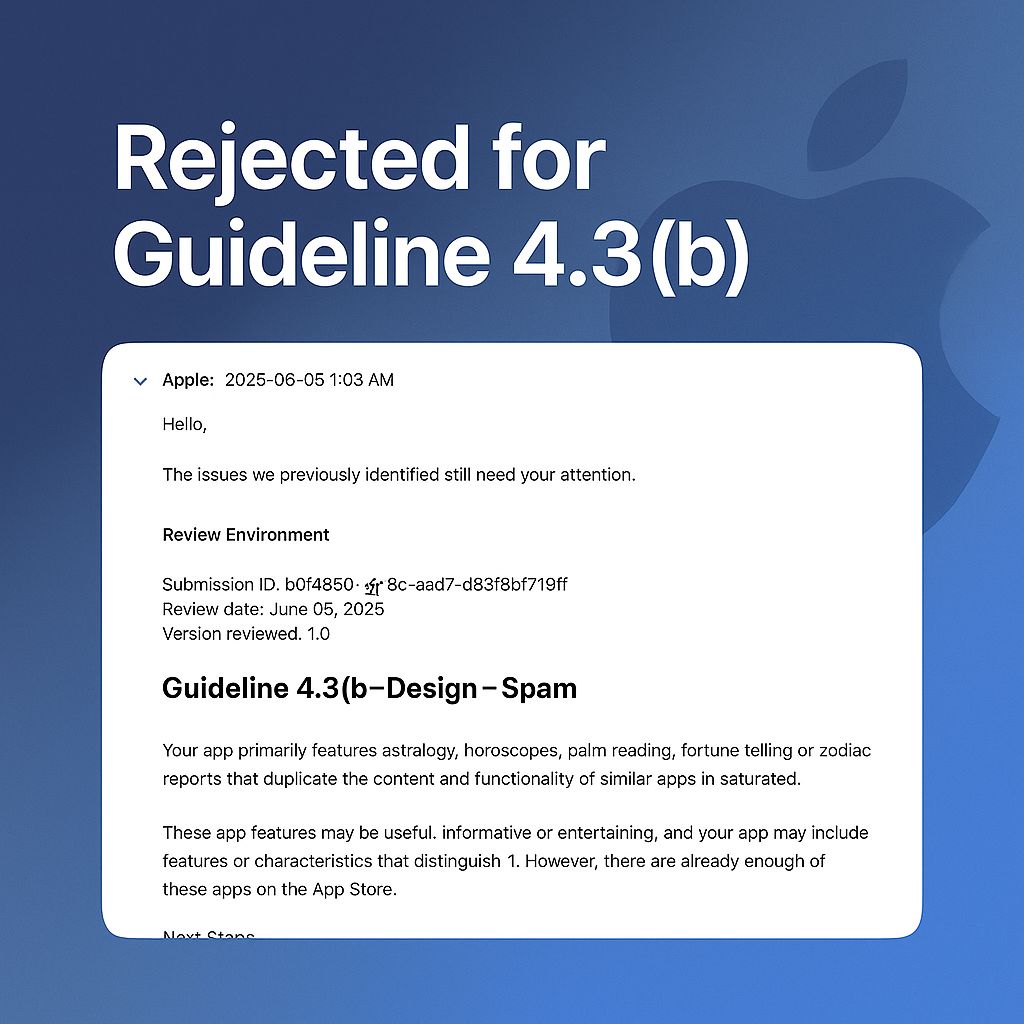
ClarityPath's public App Store review exposed a familiar problem for specialised products: a useful app can still struggle to explain its distinction inside a crowded category. Rather than reduce the product to another public listing, AppDeploy created a branded route where its purpose, access model, and installation journey can be understood before a user begins.
Pricing
Every plan starts with 14 days of everything, no card needed. Prices exclude VAT and other sales taxes; pay in pounds, US dollars or euros.
Free
No card neededUp to 5 devices, for as long as you like
Everything a small team needs to manage its first company devices.
AppDeploy
14-day trialBeyond the free 5 · or £10 per device a year · no base fee, no minimum
Every device feature, for as many devices as you need, at one price.
Everything in Free, plus
14 days of everything, no card. Afterwards the workspace stays on Free unless you choose a plan. Monthly, no minimum, stop at any time.
Distribution
With or without devicesor £219 a year · $39 or €35 a month
Your own branded app store and release controls, the same price whether or not you manage devices.
Enterprise
Terms by agreement
For organisations that need company-wide identity, directory sync and contractual commitments.
Custom pricing · No commitment · Live within 2 weeks
FAQ
Does AppDeploy replace Apple Business?
No. Apple Business stays the source for your devices, apps and licences, and they stay yours. AppDeploy syncs it on a schedule and adds device management, your branded app store and release controls on top.
Which devices does AppDeploy manage?
iPhone, iPad and Mac. A Mac counts as one device, the same as an iPhone. Android app delivery, as signed APKs, is available with Enterprise.
Does AppDeploy make us SOC 2 or ISO 27001 compliant?
No tool can do that on its own. AppDeploy gives you the device evidence those audits ask for (owners, encryption, updates, the asset register and daily history), sends it to Vanta, and exports it for Drata and your auditor.
Can we move from another device-management tool without wiping devices?
Yes. Company devices on iOS, iPadOS and macOS 26 move to AppDeploy without being erased, using Apple's migration support.
Does AppDeploy include antivirus?
No. AppDeploy deploys your chosen security agent to company Macs with its permissions approved in advance, and the full software list shows it is installed on every device.
What happens after the 14-day trial?
Every feature is open for 14 days, with no card needed. Afterwards the workspace stays on Free, with up to 5 devices, unless you choose AppDeploy, Distribution or both.
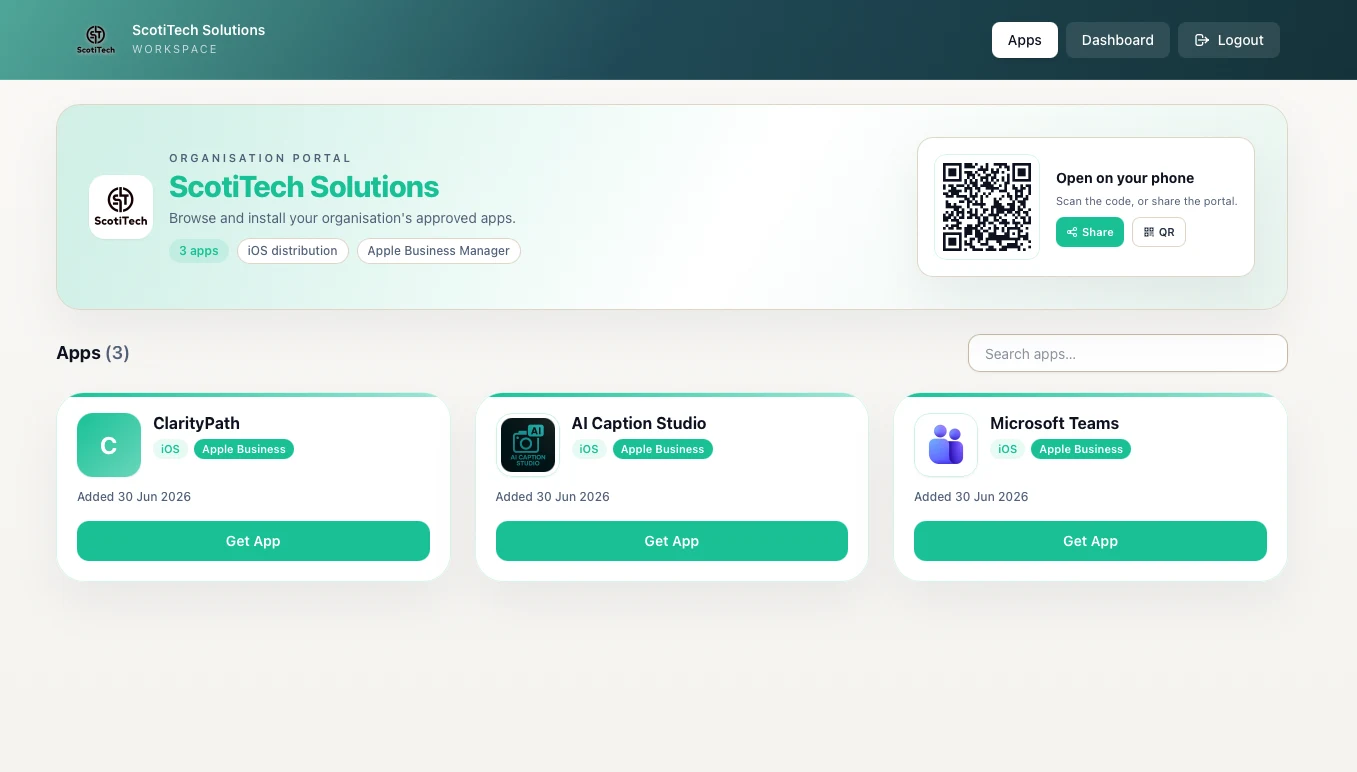
Can I see an app store before signing up?
Yes. Open ScotiTech's own branded app store at appdeploy.scotitech.com/w/scotitech-solutions to see app discovery, install guidance and branding.
Start free with up to 5 devices, with every feature open for 14 days and no card needed, or talk to our team about a larger rollout.